Introduction
Real estate is a high-velocity industry where the secret to closing deals is simple: you must help buyers and sellers make decisions faster. Because property sales involve high stakes and long timelines, modern customers do their homework early. They will explore property details, check your digital reputation, and demand a personalized experience long before they ever call your office.
Moving your business onto a real estate web portal is the ultimate fix for these hurdles. However, traditional real estate app development is notorious for being slow and incredibly pricey. In many cases, a hot property will sell before your custom app even leaves the design phase! Thankfully, a no-code app builder lets you launch a professional real estate mobile app in just a few hours—even if you have zero technical skills.
Why build a real estate app?
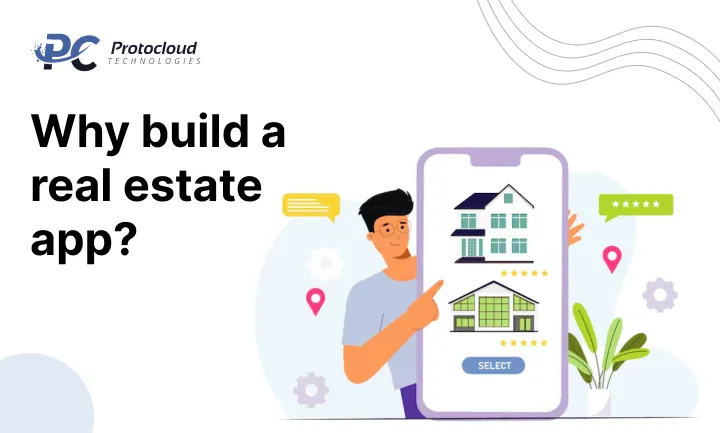
A dedicated property management app does more than look good; it centralizes your office work and supercharges your real estate CRM. By bringing transparency to your listings, you can significantly shorten the real estate sales cycle. Smart real estate software solutions allow you to master specific business niches:
- Real estate inventory management to keep a live pulse on available homes.
- Vendor management real estate for effortless coordination with your marketplace partners.
- Real estate contract management to move legal paperwork into the digital age.
- Real estate project management to track progress on construction and development sites.
- Digital payment real estate to secure large deposits and speed up transaction times.
- Rental management software to automate monthly rent collection and lower vacancy rates.
Top 9 Features of a Successful Real Estate App
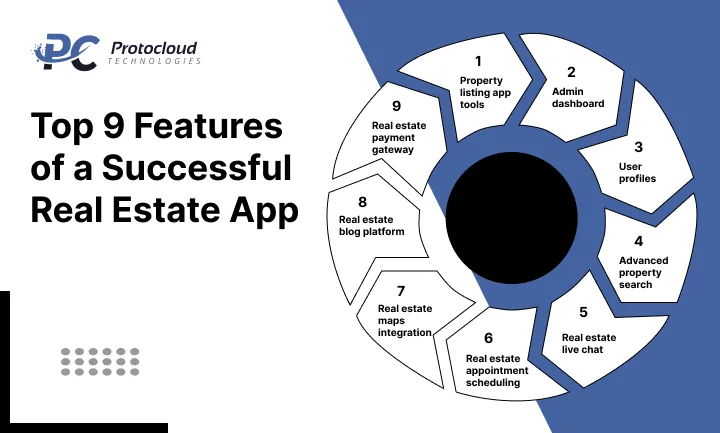
When you are hunting for a real estate app builder, ensure it includes these non-negotiable tools for modern property management software:
- Property listing app tools: Build beautiful pages that boost your property listing SEO.
- Admin dashboard: A central hub to track performance and meet client needs.|
- User profiles: Where clients save their dream homes and set up instant price alerts.
- Advanced property search: Deep filters that sort by neighborhood, cost, and home style.
- Real estate live chat: Immediate connection, so no lead ever goes cold.
- Real estate appointment scheduling: Frictionless booking for property tours.
- Real estate maps integration: Let buyers scout the local area and schools on their own.
- Real estate blog platform: Share expert advice and guides to prove you are the local pro.
- Real estate payment gateway: A secure way to handle rent or holding deposits.
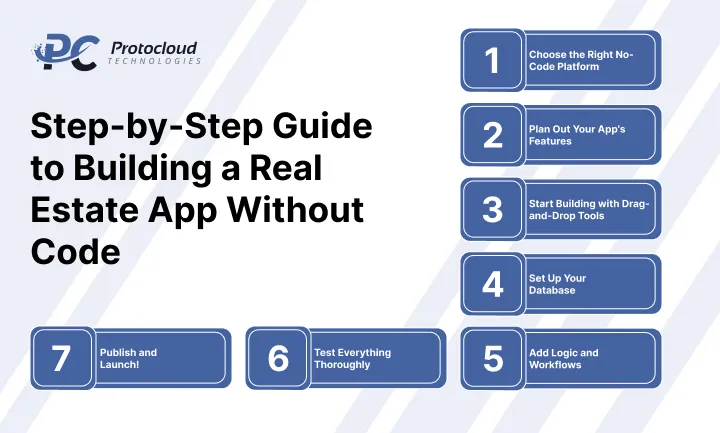
Step-by-Step Guide to Building a Real Estate App Without Code
If you have a great idea and the drive to grow, you are already halfway there. Modern real estate app development without coding has removed the wall between vision and reality. You no longer need to be a coding genius or spend six figures on a tech team. By using a no-code real estate app strategy, even a solo agent can play in the same league as the big firms.
-
Choose the Right No-Code Platform
Your journey begins with picking a drag-and-drop app builder that fits your unique workflow. Every business is different, so look for a platform that matches your specific goals:
- Bubble: The heavy hitter for custom web apps with complex “if/then” logic.
- Adalo: The go-to for a real estate mobile app that looks stunning and feels premium.
- Glide: Best for turning simple spreadsheets into an easy-to-use property app development tool.
- Thunkable: Excellent for cross-platform app development that works perfectly on both iPhone and Android.
Take the time to test-drive these real estate app builder tools to see which one feels most natural to you.
-
Plan Out Your App’s Features
Success starts with real estate app planning. Before you start dragging elements onto a screen, think about the “Who” and the “What.” Who is your primary user a buyer, a landlord, or an agent? What is the biggest headache they face today? Answering these questions helps you build a tool people will actually use.
Essential App Features Table
| Feature | What It Does |
| Map integration real estate app | Visualizes property locations for local-first buyers |
| Property search filters app | Navigates listings by price, size, and specific needs |
| Virtual tour real estate app | offers immersive 360° views right from a smartphone |
| The mortgage calculator app | helps buyers understand their monthly budget instantly |
| The Realtor contact feature | provides one-tap access to your sales team via phone or email |
| Push notification real estate app | Pings users the second a new house hits the market |
| The user profile app feature | keeps customer data and “favorite” homes organized |
| Property management dashboard app | empowers agents to track leads and update listings on the go |
-
Start Building with Drag-and-Drop Tools
Now comes the fun part. Use your chosen drag-and-drop app builder to design your app screens. Most of these platforms make the process extremely intuitive. You are therefore less likely to encounter the technical jargon that makes traditional coding so scary. Focus on a clean real estate app UI UX to keep users engaged.
To get started, focus on these core screens:
- Home Page: Show featured listings or a prominent search bar to get people moving.
- Listings Page: Display properties with clear images, prices, and quick filters.
- Details Page: Offer in-depth property info, contact buttons, and high-quality photos.
- User Profile: Allow users to log in, save their favorite listings, or view their search history.
The best thing about a no-code app builder for real estate is that it allows you to preview your design before you finish. You can see how everything looks and works in real-time. If something feels off, you can make quick changes for an enhanced mobile app design real estate experience.
-
Set Up Your Database
A database is essential for any real estate app. It is responsible for storing and organizing all that vital property information. Your real estate app builder tools will help you create one without any coding you just need to define the right fields. Think of it like a smart spreadsheet that talks to your app’s front end.
In your real estate app database setup, you should include:
- Property title and description
- Price and location data
- High-resolution images and videos
- Agent contact details and availability
You can manage this through property database management tools within the platform. You can update listings manually or connect to an external data source like Google Sheets. This keeps your dynamic property listings accurate and up to date for your users.
-
Add Logic and Workflows
In no-code platforms, real estate app workflows are the behind-the-scenes actions. They tell your app how to respond when a user interacts with it. For example, when someone taps the “Save” button, the app adds it to their favorites. This is where no-code automation workflows make your app feel like a premium product.
Setting up these workflows is a simple process. You choose an element, like a button, and define what triggers the action. Then, you select what happens next. You can chain multiple actions together, such as storing form data and notifying an agent at the same time. The most interesting aspect of real estate app development without coding is that there is no single line of code involved. It’s all about pointing and clicking.
-
Test Everything Thoroughly
It’s now time for mobile app QA testing to ensure that everything within the app meets market standards. Put yourself in the user’s place. Go through every screen and tap every button. Does the search function return the right results? Can you save a listing or contact an agent without any issues?
We recommend testing your app on various devices to ensure it has smooth cross-platform app development compatibility. Share it with friends and family for honest feedback. They might catch a bug that you missed. Fixing these small issues now ensures you launch a polished and professional app that users will trust.
-
Publish and Launch!
Happy with your app? It’s time for the app launch process. Most no-code platforms make publishing extremely straightforward. If you built a web app, you can often publish it with just one click using a custom link.
For those launching a real estate mobile app, there are a few extra steps:
- Create a developer account to publish an app on the Play Store (Android).
- Create a developer account to publish an app on App Store (iOS).
- Prepare your app screenshots, descriptions, and keywords for the listing.
- Submit your app for review.
Once the stores approve your project, your app is live! You have successfully navigated real estate app development without coding. Now, you can focus on marketing your new proptech app development project and closing more deals. Using these real estate technology solutions is the smartest way to scale your business in 2026.
What feature do you think your clients will use the most in your new app?
How a Real Estate App Can Transform Your Business
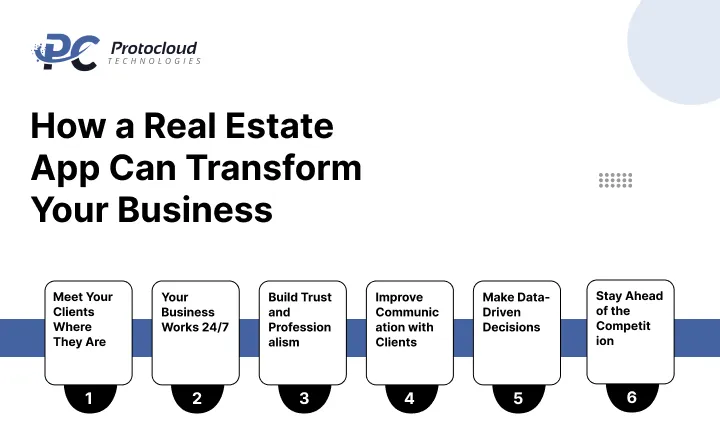
The way people buy and rent properties has completely changed. Today, most buyers rely on their smartphones to search, compare, and finalize decisions.
If your real estate business is not available on mobile, you are already a step behind.
A real estate app is no longer just an add-on. It is a powerful tool that can transform how you operate, connect with clients, and close deals faster.
-
Meet Your Clients Where They Are
Modern buyers and renters expect convenience. They do not want to switch between multiple websites or wait for agent responses.
They want everything in one place:
- Property listings
- Price comparisons
- Viewing schedules
- Direct communication
A real estate app brings all these features together, making the entire experience smooth and user-friendly.
-
Your Business Works 24/7
Unlike traditional offices, your app never closes.
Customers can browse properties anytime, whether it is late at night or early in the morning. This constant availability increases engagement and gives you more opportunities to convert leads into clients.
-
Build Trust and Professionalism
Having your own app instantly improves your brand image. It shows that your business is modern, reliable, and focused on delivering a better customer experience. It also gives you a dedicated platform where clients interact only with your brand, without distractions from competitors.
-
Improve Communication with Clients
Communication is key in real estate. With features like in-app messaging, push notifications, and instant updates, you can stay connected with your clients at every stage. This reduces delays, avoids missed inquiries, and builds stronger relationships.
-
Make Data-Driven Decisions
A real estate app is more than just a sales tool. It is a source of valuable insights.
You can track:
- Which properties get the most views
- What locations are trending
- How users interact with listings
These insights help you understand your audience better and make smarter business decisions.
-
Stay Ahead of the Competition
The real estate market is highly competitive, and standing out is not easy.
Having your own app gives you a strong advantage over businesses that still rely only on traditional methods or third-party platforms like Zillow.
It positions your brand as forward-thinking and customer-focused.
Wrapping Up
There’s no denying it the real estate app development world is a busy place. Big names like Zillow and Trulia seem to own the market. But even the giants can’t fix every single problem. Every buyer and seller has a unique story, and there’s always room for a smart, friendly real estate mobile app that makes their lives easier. Your goal is to create a property seller app or buyer tool that solves real problems and grows based on what your users actually tell you.
With no code app builder real estate tools, it has become super easy to change your design, add new tools, or fix a quick bug even after you go live. You don’t need a massive team to keep up with the real estate app market. If you’re still feeling stuck on where to start your proptech app development journey, consider talking to experts who understand real estate tech solutions. Having a guide with years of experience can help you build high-performing products that stand out from the crowd.
Questions You May Have (FAQs)
-
Can I Create a Real Estate App Without Coding?
Yes! A real estate app without coding is a reality today. These tools use visual builders and drag-and-drop app builder options. This makes the whole process feel very natural, even if you’ve never built an app before. You can focus on the real estate user experience instead of worrying about confusing computer languages.
-
What Is the Best No-Code Platform to Build a Real Estate App?
The best no-code app platforms depend on what you need. Here are the top real estate app builder tools:
- Bubble app builder: This is perfect for a highly custom real estate digital solution that works in a web browser.
- Adalo app builder: Great for a mobile-first property marketplace app with a very pretty design.
- Thunkable platform: Ideal if you want a real estate mobile solution with lots of complex logic.
- Glide app builder: Best for simple apps that turn a spreadsheet into a working property app development project.
-
How Much Does It Cost to Create a Zillow-Like App?
A traditional Zillow-like app development project can cost between $50,000 and $80,000. However, a no-code real estate app is much more affordable. No-code platform pricing usually ranges from $30 to $100 per month. This makes it a great choice for a real estate startup app.
-
Is It Possible to Build an App Without Code?
Absolutely. A mobile app without coding works because the platform handles the hard stuff like databases and security behind the scenes. You just focus on the real estate app features that your customers need.
-
How long does it take to build a real estate app?
Your real estate app timeline is much shorter with no-code. You can build a real estate app fast, often in just a few days or weeks. If you want advanced features like virtual tours, the app development time for real estate might take a little longer, but it’s still faster than traditional coding.
-
How are low-code vs no-code real estate apps different?
When comparing low code vs no code, think of it this way: no-code is for beginners who want to drag and drop. Low-code might need a tiny bit of technical knowledge. Both help with affordable app development and faster results.